From Idea to Computer Chip: How Physical Design Actually Works

Table of Contents — From Idea to Computer Chip: How Physical Design Actually Works
- What This Guide Covers
- The Big Picture: How a Chip Gets Made
- Step 1: Writing the Code (RTL Design)
- Step 2: Turning Code Into Logic Gates
- Step 3: Planning the Layout (Floorplanning)
- Step 4: Placing the Parts
- Step 5: Building the Clock Network
- Step 6: Connecting Everything (Routing)
- Step 7: Checking Everything Works
- Step 8: Sending to the Factory
- The Three Things That Matter Most
- Common Questions
What This Guide Covers
Computer chips are everywhere. Your phone has them. Your car has them. Your microwave has them. But most people have no idea how they're made.
This guide explains the journey from an idea to an actual chip. We'll focus on physical design — the process of turning a logical design into something that can be manufactured.
You don't need an engineering degree to understand this. We'll keep things simple while covering the real process that engineers follow.
Along the way, we'll mention tools that help with the maths and calculations involved. The Scientific Calculator handles complex equations. The Electrical Calculator helps with power and current calculations.
The Big Picture: How a Chip Gets Made
Before diving into details, here's the high-level flow:
- Design: Engineers write code that describes what the chip should do
- Synthesis: Software converts that code into logic gates
- Layout: The gates get arranged physically on the chip
- Verification: Testing ensures everything works correctly
- Manufacturing: A factory builds the actual chip
The first two steps are "logical design" — figuring out what the chip should do.
The next steps are "physical design" — figuring out where everything goes and how to connect it.
This guide focuses on physical design. That's where the rubber meets the road.
Step 1: Writing the Code (RTL Design)
Chips start as code. Engineers use special languages called Verilog or VHDL to describe how the chip should behave.
This code is called RTL — Register Transfer Level. It describes:
- What data goes where
- How data moves between storage elements
- What operations happen to the data
Think of RTL like a recipe. It doesn't say "put the oven at 180°C on the second shelf." It says "bake until golden brown." The details of how to achieve that come later.
Example: An RTL description might say "when the input signal goes high, store the data and send it to the output on the next clock cycle." It doesn't specify which physical wires carry the signal or where on the chip this happens.
Good RTL code is:
- Synchronous: Everything happens in step with a clock
- Clear: Other engineers can understand it
- Synthesizable: Software can convert it to gates
Why This Matters
Bad RTL code causes problems later. If the original description is confusing or inefficient, every later step becomes harder.
Getting the design right at this stage saves enormous time and money later.
Step 2: Turning Code Into Logic Gates
Once you have RTL code, software called a "synthesizer" converts it into actual logic gates.
Logic gates are the building blocks of digital circuits:
- AND gates: Output is high only if both inputs are high
- OR gates: Output is high if either input is high
- NOT gates: Output is the opposite of input
- Flip-flops: Store one bit of data
The synthesizer reads your RTL code and figures out which combination of gates produces the same behaviour.
Example: Your code says "output should be A and B, or C." The synthesizer might create an AND gate (for A and B), an OR gate (to combine with C), and connect them properly.
Libraries and Choices
The synthesizer uses a "standard cell library" — a collection of pre-designed gates. Different libraries have different trade-offs:
- Some gates are faster but use more power
- Some gates are smaller but slower
- Some gates are more reliable but bigger
The synthesizer picks gates from the library to meet your requirements.
This step produces a "netlist" — a list of all the gates and how they connect. It's like a parts list for your chip.
Use the Time Calculator to understand timing constraints. If your chip needs to run at 1 GHz, each clock cycle is 1 nanosecond. Every operation must complete in that time.
Step 3: Planning the Layout (Floorplanning)
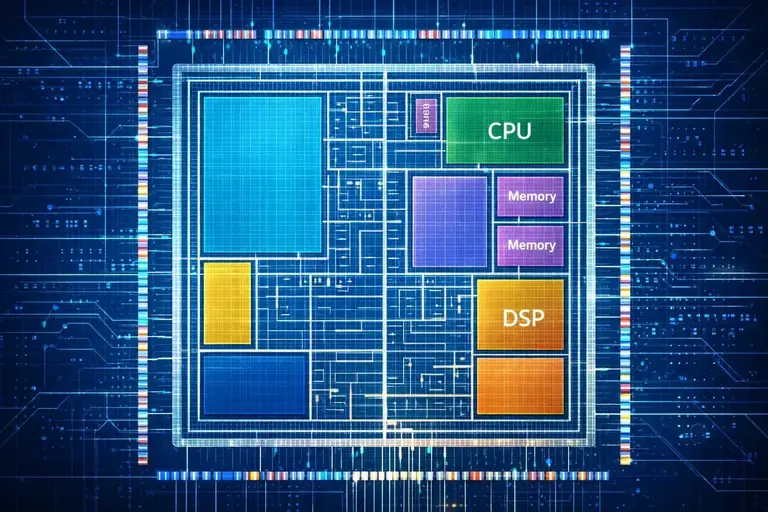
Now you have a list of gates. But where do they go?
Floorplanning is like arranging furniture before you move in. You decide:
- Where the big blocks go
- Where the inputs and outputs connect to the outside world
- How power will reach all parts of the chip
- Where the main clock signal enters
Good floorplanning makes everything else easier. Bad floorplanning creates problems that are expensive to fix.
Key Decisions
Block placement: If two blocks talk to each other a lot, put them close together. Long connections are slow and use more power.
I/O placement: Where do signals enter and leave the chip? This is often fixed by the package (the chip's outer casing).
Power planning: Electricity needs to reach every gate. You create a grid of power and ground connections, like plumbing in a house.
Clock entry: The clock signal keeps everything synchronised. It needs to reach all parts of the chip with minimal delay.
The Trade-offs
Floorplanning is about trade-offs:
- Putting everything close together saves wire length but creates heat
- Spreading things out reduces congestion but increases delays
- More power connections mean better reliability but take up space
There's no perfect answer. Just better and worse choices for your specific chip.
Step 4: Placing the Parts
After floorplanning, software places every gate onto the chip.
A modern chip might have billions of gates. This isn't done by hand. Placement algorithms figure out where each gate should go.
The goals:
- Keep connected gates close together
- Balance density across the chip
- Leave room for wires to connect everything
- Meet timing requirements
How Placement Works
The software starts with a rough placement, then improves it through many iterations. Each iteration:
- Evaluates current placement
- Finds gates that should move
- Moves them
- Checks if things got better or worse
- Repeats
This continues until the placement is good enough or can't be improved further.
Density Matters
If gates are too packed in one area, there won't be room for wires. This creates "congestion" — areas where routing fails.
If gates are too spread out, wires become long. Long wires mean slow signals and more power consumption.
Finding the right balance is key.
Step 5: Building the Clock Network
The clock is the heartbeat of a digital chip. Every flip-flop (storage element) responds to the clock edge.
For the chip to work, the clock signal must reach all flip-flops at almost exactly the same time. Any difference is called "skew."
Too much skew and the chip fails. Data arrives too early or too late. Calculations go wrong.
Clock Tree Synthesis (CTS)
Building the clock network is called Clock Tree Synthesis. The software:
- Identifies all flip-flops that need the clock
- Plans a tree structure to deliver the clock
- Inserts buffers to strengthen the signal
- Balances delays so all flip-flops see the clock together
The "tree" metaphor makes sense. One clock source branches into two, then four, then eight, and so on — until it reaches every flip-flop.
Skew and Delay
Skew: The difference in clock arrival time between different flip-flops. Should be as small as possible.
Delay: How long it takes the clock to get from source to destination. Should be consistent.
Modern chips might have millions of flip-flops. Getting the clock right is a huge engineering challenge.
Step 6: Connecting Everything (Routing)

Now all the gates are placed. The clock network is built. Time to connect everything else.
Routing is exactly what it sounds like — creating the metal wires that connect gates to each other.
The Challenge
A modern chip has billions of connections. They all need to:
- Not touch each other (unless they should)
- Be short enough for signals to arrive on time
- Fit in the available metal layers
- Not create electrical problems (noise, crosstalk)
This is incredibly complex. Routing can take hours or days of computer time.
Metal Layers
Chips aren't flat. They have multiple layers of metal stacked on top of each other, separated by insulation.
Typically:
- Lower layers connect nearby things
- Middle layers carry signals across medium distances
- Top layers carry power, ground, and global signals
The layers alternate direction. If layer 3 runs horizontal, layer 4 runs vertical. This makes connections possible without too many layer changes.
Routing Algorithms
Routing software works in stages:
- Global routing: Plans rough paths for all connections
- Detailed routing: Fills in exact wire paths
- Search and repair: Fixes any failed connections
Sometimes routing fails. If too many wires need to go through the same area, some can't fit. When this happens, engineers go back to placement or even floorplanning to fix the problem.
Use the Electrical Calculator to understand resistance, current, and voltage drop in long wires.
Step 7: Checking Everything Works
A chip costs millions to manufacture. You don't want to discover problems after the factory delivers them.
Verification checks everything before sending the design to manufacturing.
Timing Verification
The most important check is timing. Does data arrive where it needs to be, when it needs to be there?
Static Timing Analysis (STA) checks every path through the chip. It calculates:
- How long signals take to travel
- Whether they arrive before the clock edge
- Whether there's margin for variation
STA considers:
- Setup time: Data must arrive before the clock edge
- Hold time: Data must stay stable after the clock edge
- Wire delays: Longer wires mean slower signals
- Gate delays: Each gate takes time to switch
If any path fails timing, the design needs work.
Physical Verification
Design Rule Checking (DRC) verifies that the layout follows manufacturing rules. Wires must be:
- Wide enough (minimum width)
- Far enough apart (minimum spacing)
- Properly connected (no opens or shorts)
Layout vs Schematic (LVS) confirms the physical layout matches the intended circuit. It extracts the actual connections from the layout and compares them to what the design says should exist.
Power Verification
IR Drop Analysis checks that voltage reaches all parts of the chip. Wires have resistance. Current flowing through resistance creates voltage drop. If the drop is too large, gates don't get enough voltage and fail.
Power verification ensures the power grid is adequate.
Step 8: Sending to the Factory
Once everything checks out, the design becomes a file called GDSII (or newer formats like OASIS).
This file contains the exact shapes that will be manufactured — every wire, every gate, every connection.
The factory (called a "fab") uses this file to create masks. Masks are like stencils used in a photographic process to create the chip layer by layer.
Manufacturing takes weeks. The factory builds thousands of chips on a single wafer, then cuts them apart and packages them.
The Three Things That Matter Most

Every decision in chip design comes back to three factors: timing, power, and area.
Timing (Speed)
How fast can the chip run? This depends on the longest path through the circuit.
Faster chips are better. But faster chips usually cost more and use more power.
Use the Scientific Calculator to work with frequencies and periods. A 2 GHz chip has a 0.5 nanosecond clock period.
Power
How much electricity does the chip use? Power matters for:
- Battery life in mobile devices
- Heat generation in all devices
- Electricity costs in data centres
Power comes in two forms:
- Dynamic power: Used when gates switch states
- Leakage power: Constantly leaking even when idle
Lower power is better, but usually means slower or bigger chips.
Area
How big is the chip? Smaller chips:
- Cost less to manufacture (more chips per wafer)
- Fit in smaller devices
- Often have less leakage power
Smaller is better, but usually means compromises on speed or power.
The Impossible Triangle
You can't optimise all three at once. Improving one usually hurts another.
- Faster often means more power and larger area
- Lower power often means slower and larger
- Smaller often means slower and more power-hungry
Engineers spend their careers navigating these trade-offs. The right balance depends on what the chip is for.
Common Questions
How long does it take to design a chip?
Simple chips: months. Complex chips (like phone processors): years. The physical design portion is usually 30-50% of total time.
Can I design a chip at home?
Sort of. Open-source tools exist for learning. But manufacturing requires expensive factories. Some programmes let hobbyists fabricate small designs affordably.
Why are some chips harder to design than others?
Complexity, speed requirements, and power constraints. A chip that needs to run at 3 GHz with 1 watt of power is much harder than one running at 100 MHz with no power limit.
What software do chip designers use?
Major tools include:
- Synopsys (synthesis, timing, place and route)
- Cadence (place and route, verification)
- Mentor/Siemens (verification, DRC/LVS)
These tools cost millions of pounds per year. That's why chip design happens at big companies, not garages.
How do chips keep getting smaller?
Better manufacturing technology. The "7nm" or "5nm" numbers you see refer to transistor sizes. Smaller transistors mean more fit on a chip. But each new size costs billions to develop.
What's the hardest part of physical design?
Timing closure — getting every path in the chip to meet timing requirements. It can require weeks of iteration between placement, routing, and timing fixes.
Wrapping Up
Making a chip is one of the most complex things humans do. It involves:
- Writing code that describes behaviour
- Converting that code to logic gates
- Planning where everything goes
- Placing billions of components
- Building clock networks
- Routing connections
- Verifying everything works
- Manufacturing in factories that cost billions
Understanding this process helps you appreciate the chips in your pocket. Every phone, every laptop, every smart device represents millions of engineering hours.
The tools keep getting better. AI is starting to help with placement and routing. But the fundamentals remain: turn an idea into a layout that can be manufactured.
It's hard. It's complex. And it powers everything.
Related Resources
- Scientific Calculator — Complex calculations
- Electrical Calculator — Power, current, voltage
- Time Calculator — Timing calculations
- Percentage Calculator — Efficiency metrics